<img height="1" width="1" style="display:none" src="https://www.facebook.com/tr?id=290087781365875&amp;ev=PageView&amp;noscript=1">
Skip to main content

At-the-Desk
Charging Solutions
for Classrooms

Keep student devices powered without disrupting instruction. JAR Systems' at-the-desk charging solutions provide flexible, classroom-friendly power options that reduce downtime, eliminate charging bottlenecks, and support uninterrupted learning.

  • Keep devices powered throughout the school day
  • Reduce classroom disruptions caused by low batteries
  • Support Chromebooks, laptops, tablets, and USB-C devices
  • Complement charging carts with flexible in-classroom charging
Banner-Image-At-Desk-Charging(1)(1)

Why Schools Need At-the-Desk Charging Solutions

As schools expand 1:1 device programs, keeping devices charged throughout the day has become a growing challenge. Traditional charging carts alone may not always provide enough flexibility, especially when devices arrive at school partially charged or are used heavily throughout the day.


At-the-desk charging solutions allow students to recharge devices while they work, helping schools reduce disruptions and maximize instructional time.

Headache icon

Reduce Learning Disruptions

When devices lose power during class, learning stops. At-the-desk charging gives students immediate access to power without leaving the classroom.

Brain icon

Support 1:1 Device Programs

As students take devices between home and school, battery levels can vary significantly each day. Classroom charging options help fill the gap.

Chromebook icon

Keep Devices Available All Day

Whether students are testing, collaborating, or completing assignments, reliable access to power helps ensure devices remain available when needed.

Budget icon

Avoid Costly Facility Upgrades

Adding new electrical outlets, floor boxes, or ceiling power drops can be expensive and disruptive. At-the-desk charging expands charging access without requiring major modifications to existing school infrastructure.

Repeat Icon

Create More Flexible Learning Spaces

Students shouldn't have to sit near the nearest outlet to stay charged. At-the-desk charging supports flexible seating arrangements and classroom layouts without relying on charging towers or fixed power locations.

Charger icon

Eliminate Classroom Charging Hazards

Traditional charging methods often require power strips and extension cords to run across classroom floors, creating clutter and potential tripping hazards. At-the-desk charging provides safer access to power where students need it.

Key Features of Our At-the-Desk Charging Solutions

Designed specifically for K–12 environments, JAR Systems' at-the-desk charging solutions help schools provide power where students need it most—at their desks.

Charger icon

Charge Devices Without Leaving the Classroom

Students can stay engaged in instruction while charging their devices, reducing interruptions and minimizing classroom movement.

  • Charge while learning
  • Reduce classroom disruptions
  • Improve instructional continuity
Chromebook icon

Flexible USB-C Power for Modern Devices

Support a wide range of USB-C devices, including Chromebooks, laptops, tablets, and emerging classroom technologies.

  • Compatible with USB-C Power Delivery devices
  • Simplified charging infrastructure
  • Reduced dependence on individual adapters
Charger icon

Supports Layered Charging Strategies

At-the-desk charging complements charging carts and charging stations, creating a complete device charging ecosystem for schools.

  • Ideal for supplemental charging
  • Supports 1:1 initiatives
  • Helps prevent battery-related downtime

Explore Our At-the-Desk Charging Solutions

JAR Systems at-the-desk charging solutions are designed for modern K–12 device environments, helping schools keep devices powered during instruction, reduce downtime, and support uninterrupted learning throughout the school day.

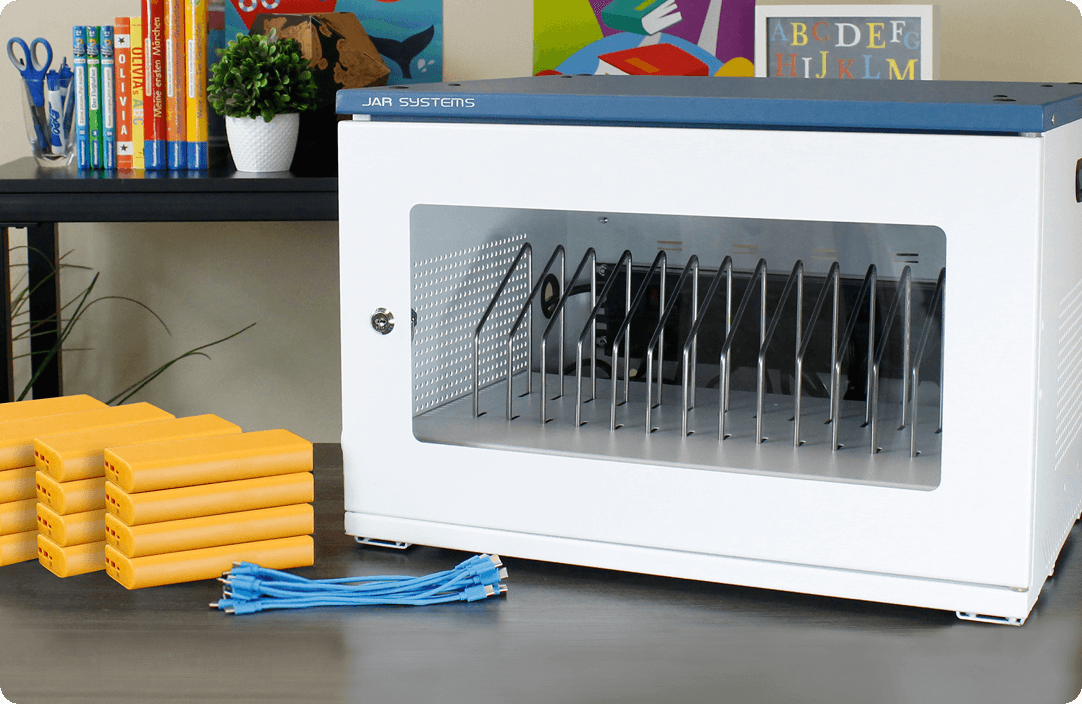
Open6 USB-C Charging Station with Active Charge Starter Kit

Capacity Up to 6 Devices
Charging Type USB-C PD + Portable Power Banks
Mobility Portable Charging
Ideal For Small Classrooms & Supplemental Charging

Key Features:

  • Charge devices while students continue learning
  • Includes portable power banks for flexible charging access
  • Compact footprint for classrooms and learning spaces
  • USB-C Power Delivery for Chromebooks, laptops, and tablets
  • Helps reduce disruptions caused by low batteries

Need help choosing the right solution?

Talk to a Specialist

Why Schools Choose At-the-Desk Charging

Many districts are adopting at-the-desk charging strategies to complement traditional charging carts and support evolving classroom technology needs.

"State testing has been a breeze this year because of JAR Systems. My productivity has increased a great deal because I don't have dead devices anymore. It’s amazing what a simple change can do."

Daniel Flint

Lead US History Teacher Westside High School, Duval County Public Schools

"JAR Systems offered us a solution that allowed us to have power banks in all of our classrooms where students can take the charged power banks, plug them into their computer, and continue working at the desk. The difference that this modernized charging solution had on learning and accessibility is invaluable."

Amy Sterckx

Executive Director of Information and Technology Green Bay Area Public Schools

"If you design technology in a classroom correctly, it just works, and the teacher does not have to think about it. That’s exactly what JAR Systems did for our teachers."

Russ Selken

Chief Technology Officer Modesto City Schools

Resources & Helpful Articles

Expert guidance to help you make informed decisions about classroom charging solutions

5 Tips for Technology Directors When Selecting Technology for Your K-12 District

5 Tips for Technology Directors When Selecting Technology for Your K-12 District

As technology continues to reshape the classroom experience for students and educators, K-12 districts face the...

Empowering Education: Active Charge Upgrade Revolutionizing High School Classrooms

Empowering Education: Active Charge Upgrade Revolutionizing High School Classrooms

Unleashing the Power of Active Charge: A Teacher's Perspective In the ever-evolving landscape of education, where...

Step-by-Step Guide: How to Set Up an Effective Chromebook Charging Station for Your Classroom

Step-by-Step Guide: How to Set Up an Effective Chromebook Charging Station for Your Classroom

Modern classrooms look far different than those even just 20 years ago, offering students and teachers dynamic and...

Frequently Asked Questions
Still have questions? Get in touch

At-the-desk charging allows students to charge devices while using them in the classroom rather than returning them to a centralized charging cart or storage location.

Schools use at-the-desk charging to reduce instructional disruptions, support 1:1 device programs, and ensure devices remain powered throughout the school day.

Most modern USB-C devices, including Chromebooks, laptops, tablets, and other classroom technology, can be supported with compatible charging solutions.

No. Many schools use at-the-desk charging alongside charging carts as part of a layered charging strategy. Carts often handle overnight charging, while classroom charging provides supplemental power during the day.

Many schools combine overnight charging with classroom charging access to ensure students have power available whenever they need it.

Yes. Purpose-built classroom charging solutions are designed to provide organized cable management and controlled power delivery for safe daily use.

Disruptions ↓
Instructional Time ↑

Edmonds School District is one of many to adopt new
at-the-desk USB-C charging solutions:
"One of the things that we like about the products is their flexibility. We have the ability to meet the students’ charging needs wherever they are located, and we can do that without tripping or fire hazards. It’s been really great for teachers since it is a simple task, having the student go pick up a power bank, plug it in, and get back to learning. So, the negative impact on instructional time is vastly reduced."
Edmonds school logo

Chris Bailey
Director of Technology
Edmonds School District, WA

Stay Plugged In

Get the Latest Technology in Your Inbox

Hex Images about family and connectivity devices-1