
A Successful 1:1 Program Requires More Than Student Devices
Launching a 1:1 device program is often viewed as a technology purchase.
Districts evaluate laptops, operating systems, protective cases, and software platforms. Once devices are distributed, the assumption is that the implementation is complete.
In reality, the devices are only one piece of the equation.
A successful 1:1 initiative also depends on how those devices are charged, supported, and kept available throughout the instructional day. As schools rely more heavily on digital curriculum, online assessments, and collaborative learning, uninterrupted access to power has become just as important as access to the devices themselves.
That's why many districts are rethinking how charging fits into their overall 1:1 strategy.
Step 1: Understand When Students Actually Need Power
Before introducing new charging solutions, start by understanding how devices are used throughout the school day.
Rather than assuming every classroom has the same needs, ask questions such as:
- When do battery issues typically occur?
- Which grade levels use devices most heavily?
- Are certain classrooms more affected than others?
- Do testing days create additional charging challenges?
- Are students frequently searching for outlets during instruction?
Understanding when and where charging problems occur helps districts focus improvements where they'll have the greatest impact.
Planning Tip: Battery issues are often concentrated in just a handful of classrooms or instructional scenarios. Identifying those patterns first can help prioritize deployment.
Step 2: Identify the Gaps in Your Current Charging Strategy
Many districts discover that their charging process has evolved through workarounds rather than intentional planning.
Common signs include:
- Students moving seats to reach wall outlets
- Power strips stretched across classroom floors
- Teachers supplying personal chargers
- Students borrowing adapters from one another
- Devices running out of power before the end of the school day
- IT staff responding to preventable charging-related support requests
These challenges aren't necessarily caused by poor devices—they're often symptoms of charging infrastructure that no longer matches the way classrooms operate.
Step 3: Decide Where At-the-Desk Charging Creates the Most Value
Not every classroom requires the same charging solution.
At-the-desk charging solutions are designed to keep students working when device batteries run low during the school day. Rather than sending students to a charging cart or wall outlet, these solutions provide portable power directly at the student's desk so instruction can continue uninterrupted.
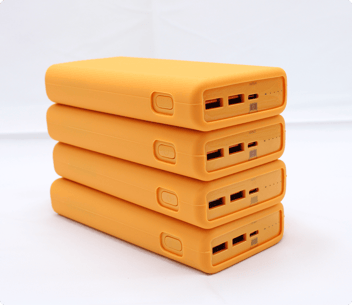 For many schools, this means using Active Charge Power Banks—portable USB-C battery packs that students can quickly check out, connect to their device, and continue working without leaving their seat.
Rather than deploying at-the-desk charging everywhere at once, many districts begin with the learning environments where uninterrupted device availability matters most.
Common starting points include:
- High school classrooms with extended instructional blocks
- Testing and assessment rooms
- STEM and engineering labs
- Media centers and collaborative learning spaces
- Pilot classrooms evaluating new instructional technology
Starting with targeted deployments allows districts to evaluate classroom workflows before expanding to additional buildings or grade levels.
Step 4: Build on the Infrastructure You Already Have
One of the biggest misconceptions about at-the-desk charging is that it replaces existing charging infrastructure.
In reality, it strengthens it.
Many districts already rely on charging carts to provide secure overnight storage and organized device management. At-the-desk charging extends that strategy by solving a different challenge: keeping students productive when devices run low during the school day.
A layered charging strategy might include:
- Elevate™ Charging Carts for overnight charging and device storage.
- Active Charge Power Banks serve as JAR Systems' at-the-desk charging solution, allowing students to check out a charged USB-C power bank, connect it to their laptop, and continue working without leaving their desk or interrupting instruction.
Each solution addresses a different stage of the instructional day, creating a more resilient charging ecosystem that supports both overnight charging and continuous classroom learning.
Real-World Example: Green Bay Area Public Schools
A layered charging strategy isn't just a planning concept—it's already helping districts keep students learning without disrupting instruction.
Green Bay Area Public Schools, which supports approximately 20,000 Chromebooks in a 1:1 take-home program, implemented JAR Systems' Active Charge Power Banks to give students convenient access to power throughout the school day.
As Amy Jaekel, Executive Director of Information and Technology, explains:
"JAR Systems offered us a solution that allowed us to have power banks in all of our classrooms where students can take the charged power banks, plug them into their computer, and continue working at the desk. The difference that this made in delivering instruction had on learning and accessibility is invaluable."
By allowing students to simply grab a charged power bank and return to their desks, the district reduced classroom disruptions while improving instructional continuity and device accessibility. It's an example of how a layered charging strategy can support 1:1 learning without relying solely on centralized charging.
Step 5: Measure Success Beyond Battery Percentage
It's easy to evaluate charging success by looking at whether devices remain powered.
But the real benefits extend much further.
Successful implementations often result in:
- Fewer classroom interruptions
- Less time spent managing chargers and cables
- Fewer charging-related IT support requests
- Improved readiness for online testing
- More consistent instructional time
- Better classroom organization
When charging becomes part of the classroom instead of an obstacle to it, teachers spend more time teaching and students spend more time learning.
1:1 Charging Rollout Checklist
Before expanding at-the-desk charging across your district, consider the following:
✓ Identify classrooms experiencing the greatest charging challenges.
✓ Review existing charging carts and overnight charging workflows.
✓ Determine where at-the-desk charging will have the greatest instructional impact.
✓ Verify classroom power availability and furniture layouts.
✓ Standardize USB-C charging where practical to simplify long-term device management.
✓ Gather feedback from teachers before expanding deployment district-wide.
A phased implementation often produces better long-term results than attempting to deploy new charging infrastructure everywhere at once.
 Want a More Comprehensive Evaluation Checklist?
Planning charging infrastructure for a 1:1 device program involves more than classroom placement and overnight charging. If you're evaluating new charging solutions, download JAR Systems' Buyer's Guide: 25 Questions to Ask When Evaluating Device Charging Solutions. It provides a practical framework for comparing charging carts, stations, power management, scalability, and long-term operational considerations before making your next investment.
Good Charging Strategies Grow with Your 1:1 Program
A 1:1 initiative doesn't stop evolving after devices are distributed.
As student populations grow, classrooms change, and new technology is introduced, charging infrastructure must adapt alongside it.
Districts that view charging as part of their overall instructional strategy—not simply a facilities concern—are better positioned to support future device refreshes, reduce operational challenges, and create more reliable classroom technology experiences.
The goal isn't simply to keep batteries charged.
It's to build a 1:1 program where technology remains available whenever learning depends on it.