
A Dead Battery Shouldn't Disrupt a Lesson
A science class is halfway through a collaborative project when the first Chromebook battery warning appears.
A few minutes later, another student raises a hand because their laptop is almost out of power. Someone moves to sit near an outlet. Another borrows a charger from the teacher. Before long, students are shifting seats, cables are stretched across the floor, and the lesson has lost momentum.
None of these interruptions seem significant on their own.
Collectively, however, they create friction that pulls attention away from learning.
As schools continue expanding 1:1 initiatives and integrating technology into everyday instruction, reliable access to power has become just as important as reliable access to Wi-Fi. Keeping devices charged throughout the day isn't simply an IT concern—it's part of creating classrooms where teaching and learning can continue without unnecessary interruptions.
That's where at-the-desk charging solutions come in.
Why Classroom Charging Has Changed
For many years, overnight charging carts were enough. Students returned devices at the end of the day, they charged overnight, and the process repeated the next morning.
Today's classrooms look different.
Students spend more time using digital curriculum, collaborating online, streaming educational content, completing assessments, and participating in project-based learning. Devices remain active for much longer periods, and not every student begins the day with a fully charged battery.
At the same time, classroom layouts have evolved. Flexible seating, collaborative workspaces, and mobile learning make it less practical for students to leave their desks whenever a battery runs low.
Rather than bringing students to available power, many schools are beginning to bring power directly to students.
What Happens When Charging Interrupts Instruction?
When classroom charging isn't readily available, teachers often develop workarounds that keep lessons moving—but aren't ideal.
Students may:
- Leave their seats to find an available outlet.
- Rotate devices between classmates.
- Share chargers or borrow power adapters.
- Pause work while waiting for a charging cart.
- Move desks or chairs closer to wall outlets.
Teachers may find themselves managing charging logistics instead of focusing on instruction, while IT teams respond to avoidable support requests caused by inconsistent charging routines.
Even something as simple as running extension cords or power strips across classroom floors introduces safety concerns and creates unnecessary clutter.
Reliable classroom technology depends on more than fully charged devices each morning. It also depends on giving students access to power when and where they need it.
Bringing Power to the Student Instead of the Student to the Power
At-the-desk charging takes a different approach.
Instead of expecting students to leave their workspace whenever a battery runs low, charging access is built directly into the classroom environment. Students simply connect their device and continue working without disrupting instruction.
This approach is particularly valuable in classrooms where devices remain in use for extended periods or where instructional continuity is especially important.
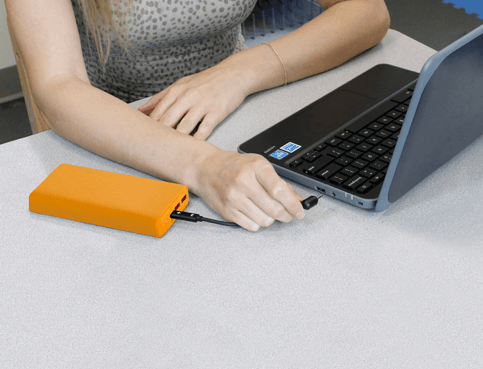
 JAR Systems' at-the-desk charging solutions, including Active Charge Power Banks, are designed around this concept by providing students with convenient access to power directly at their desks. This approach helps eliminate the need for shared wall outlets, extension cords, or relocating devices to centralized charging locations, allowing students to remain engaged while their devices recharge.
The goal isn't simply to charge devices—it's to keep learning moving.
Where At-the-Desk Charging Makes the Biggest Difference
While nearly any classroom can benefit from convenient access to power, some learning environments see an even greater impact.
Elementary Classrooms
Shared classroom devices often remain in constant use throughout the day. At-the-desk charging helps teachers keep devices available without interrupting activities or rotating students through limited charging locations.
Middle and High School 1:1 Programs
Students carry their assigned devices between multiple classes, making battery life less predictable. Providing charging at each desk helps reduce interruptions during longer instructional blocks.
Testing Environments
During online assessments, maintaining uninterrupted device availability is essential. At-the-desk charging allows students to remain focused without relocating to find available power.
Flexible Learning Spaces
Libraries, media centers, makerspaces, and collaborative classrooms often support changing furniture layouts and varied instructional activities. Distributed charging provides greater flexibility than relying solely on perimeter wall outlets.
It's Not About Replacing Charging Carts
At-the-desk charging isn't intended to replace classroom charging carts.
Both solutions serve different—but complementary—roles within a school's charging strategy.
Charging carts remain the preferred solution for:
- Secure overnight charging
- Device storage
- Shared classroom sets
- Transporting devices between learning spaces
At-the-desk charging addresses a different challenge: maintaining device availability while instruction is taking place.
Many districts find that combining both approaches creates a more resilient charging strategy. Devices can charge overnight in carts, while at-the-desk charging provides convenient access to power whenever students need it during the school day.
Rather than choosing one solution over another, schools often achieve the best results by matching each solution to the role it performs best.
 Could Your Classrooms Benefit from At-the-Desk Charging?
If any of these situations sound familiar, it may be time to evaluate your classroom charging strategy:
- Students regularly search for available outlets during class.
- Teachers keep spare chargers at their desks.
- Power strips and extension cords are common throughout classrooms.
- Devices frequently run out of battery before the end of the school day.
- Charging interruptions reduce instructional time.
Small workflow improvements can have a meaningful impact on both teaching and learning.
Reliable Power Helps Technology Fade into the Background
The best classroom technology isn't the technology students notice.
It's the technology that simply works.
When devices remain powered throughout the instructional day, teachers spend less time troubleshooting, students stay engaged with lessons, and IT teams receive fewer preventable support requests.
At-the-desk charging solutions help make that possible by providing convenient access to power exactly where learning happens.
As schools continue expanding digital learning initiatives, reliable classroom charging isn't just about keeping batteries full—it's about creating learning environments where technology supports instruction instead of interrupting it.
Further Reading
If you're exploring ways to improve classroom charging and support uninterrupted instruction, these resources offer additional perspectives on charging infrastructure and technology planning in K–12 schools.
- EdTech Magazine: Classroom Charging Stations and Carts: What to Look For
https://edtechmagazine.com/k12/article/2025/08/classroom-charging-stations-perfcon - ISTE (International Society for Technology in Education): Resources and insights on effective technology integration in K–12 classrooms.
https://iste.org/ - Incident IQ: 1:1 Technology in Schools: A Guide for Decision Makers
https://www.incidentiq.com/blog/benefits-and-challenges-of-1-to-1-technology-in-schools
Keep students learning—not searching for an outlet. Discover how JAR Systems' Active Charge Power Banks provide flexible at-the-desk charging for today's K–12 classrooms.