
Most conversations about student screen time focus on instructional strategy.
Should devices be used less often? Should younger students spend less time on screens? Should schools reduce take-home technology programs?
These are important questions—but for district technology leaders, another conversation is happening behind the scenes.
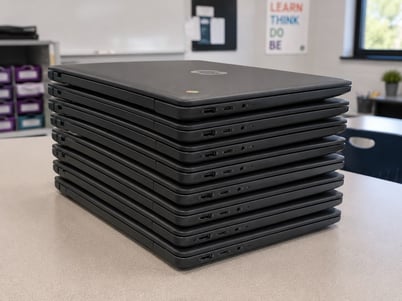 If more student devices stay at school instead of going home, who is responsible for keeping thousands of devices charged, organized, and ready for instruction every morning?
As more districts explore in-class-only device programs or expand shared classroom sets, charging becomes more than an IT task—it becomes a critical operational function.
From Student Responsibility to District Responsibility
One of the hidden advantages of traditional 1:1 take-home programs was that charging responsibilities were shared.
Students typically took devices home, plugged them in overnight, and returned the next day with fully charged batteries.
As more devices remain on campus, that responsibility shifts back to the district.
Technology teams may suddenly find themselves responsible for:
- Charging hundreds or even thousands of devices overnight.
- Collecting and redistributing devices each day.
- Monitoring charging readiness before classes begin.
- Managing charging equipment across multiple schools and grade levels.
For districts already managing large device fleets, this represents a significant operational change.
Where New Operational Bottlenecks Begin
Moving devices back onto campus doesn't simply increase the number of devices being charged… it changes the entire workflow surrounding them.
Questions that may not have existed under a take-home model suddenly become daily operational considerations.
For example:
- Is there enough charging capacity to support every device overnight?
- Where will devices be stored when they're not in use?
- How will classrooms collect and distribute shared devices efficiently?
- Are charging cables organized and easy to maintain?
- Can IT staff realistically manage additional charging infrastructure across multiple buildings?
Individually, these challenges may seem manageable.
Collectively, they can create new demands on technology teams that were never part of the original 1:1 deployment strategy.
Why Yesterday's Charging Infrastructure May Not Be Ready
Many districts already own charging carts purchased years ago.
The question isn't whether those carts still function—it's whether they were designed for today's operational demands.
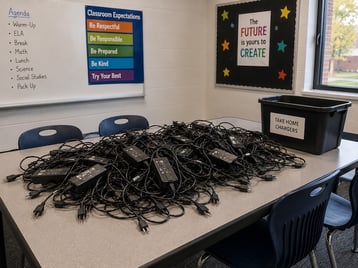 Legacy charging systems were often built around:
- Individual AC power adapters
- Large bundles of charging cables
- Manual cable organization
- Slower charging approaches
- Higher maintenance requirements
Today's classrooms operate differently.
Districts increasingly need charging infrastructure that supports:
- High-volume overnight charging
- USB-C Power Delivery (PD)
- Mixed-device environments
- Simplified cable management
- Lower long-term maintenance
The shift isn't simply about replacing old equipment—it's about ensuring charging infrastructure can support the scale and workflows of modern device programs.
Planning Before Expanding On-Campus Charging
Before purchasing additional charging equipment, districts should evaluate how their current infrastructure supports an in-class device model.
Consider questions such as:
- How many devices will remain on campus each night?
- Does existing charging capacity meet projected demand?
- Are current charging carts or stations compatible with today's USB-C devices?
- Where will devices be stored and charged between instructional days?
- How much staff time is currently spent managing charging logistics?
Planning Tip: Before investing in additional charging equipment, inventory the charging infrastructure already in your district. Some existing solutions may continue to meet your needs, while others may be candidates for modernization rather than complete replacement.
Taking time to evaluate current workflows often leads to smarter infrastructure decisions and better long-term budget planning.
Modern Charging Supports Modern Device Programs
As classroom technology has evolved, so has charging infrastructure.
Modern USB-C Power Delivery charging solutions eliminate many of the challenges associated with legacy AC adapter-based systems by providing cleaner cable management, simplified maintenance, and more efficient power delivery.
For districts supporting large device fleets, this can translate into:
- Faster overnight charging workflows
- Fewer charging accessories to manage
- Improved cable organization
- Greater support for mixed-device environments
- Infrastructure that can adapt as technology programs evolve
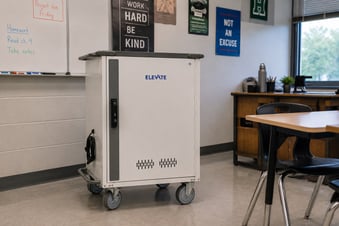 For example, JAR Systems' USB-C Power Delivery charging carts and charging stations are designed to help districts expand overnight charging capacity while reducing the maintenance demands associated with traditional AC adapter-based charging systems.
Rather than simply replacing older carts, many districts are using modern charging infrastructure to support entirely new operational models.
Operational Readiness Checklist
If your district is evaluating in-class device programs or reducing take-home deployments, use this checklist as a starting point.
✓ Have we estimated how many additional devices will require overnight charging?
✓ Does our current charging infrastructure have enough capacity?
✓ Are our existing charging carts designed for today's USB-C devices?
✓ Do we have consistent charging workflows across all schools?
✓ Have we considered future device refreshes when evaluating charging infrastructure?
✓ Are we minimizing maintenance while maximizing device readiness?
The answers to these questions can help determine whether your district is operationally prepared for changing device policies.
For additional insight, check out our buyer's guide and discover all of the essential questions to ask to upgrade your charging setup—without rewiring, wasted IT hours, or classroom disruptions.
Preparing for What's Next
The conversation around student screen time will likely continue to evolve, and with it, so will district technology programs.
Whether schools adopt shared classroom sets, in-class-only deployments, or hybrid 1:1 models, one thing remains consistent: devices still need to be ready when instruction begins.
Planning for that reality means looking beyond the devices themselves and evaluating the infrastructure that supports them.
Districts that assess their charging capacity, modernize outdated equipment where appropriate, and design workflows around today's instructional needs will be better prepared to adapt—regardless of how technology policies continue to change.
As more devices remain on campus, your charging infrastructure becomes part of your instructional strategy. JAR Systems can help you build a modern USB-C charging solution that keeps devices ready for every school day.