
When districts begin evaluating a new student device, one of the first questions isn't about the laptop—it's about the infrastructure already in place.
Will existing charging carts still work? Can current USB-C charging systems support the new devices? Or does a hardware refresh mean replacing charging equipment, too?
For many schools, the answer is encouraging: existing charging infrastructure may already support MacBook Neo. The key is understanding how that infrastructure delivers power and whether it's designed to accommodate modern USB-C devices.
Before budgeting for new charging equipment, it's worth taking a closer look at what you already have.
The Short Answer
In many cases, yes—existing school charging carts and USB-C charging infrastructure can support MacBook Neo devices.
However, compatibility depends on more than simply having a USB-C connector.
IT teams should evaluate:
- USB-C Power Delivery (PD) support
- Charging wattage
- Charging architecture
- Physical fit within the charging solution
Understanding those four factors will usually provide a much clearer answer than simply looking at the connector type.
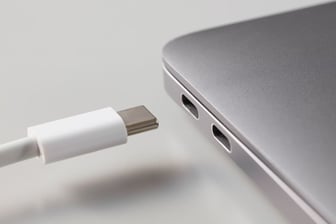 Compatibility Isn't Determined by the Connector Alone
It's easy to assume that if both the charging cart and the laptop use USB-C, everything will work seamlessly.
In reality, USB-C is only the physical connector.
Successful classroom deployment depends on how power is delivered behind that connector.
Four areas deserve attention before introducing MacBook Neo into an existing charging environment.
USB-C Power Delivery
Modern laptops rely on USB-C Power Delivery (PD) to negotiate charging safely and efficiently.
Charging systems that support USB-C PD automatically communicate with connected devices to deliver the appropriate amount of power.
Charging Capability
Different laptops have different charging requirements.
Rather than focusing only on the maximum wattage printed on a power adapter, schools should evaluate whether the charging system is designed to provide appropriate power for typical classroom use across their device fleet.
Charging Architecture
Not all charging carts distribute power the same way.
Understanding how your existing solution is designed often determines compatibility more than the connector itself.
Physical Fit
Compatibility isn't only electrical.
Before deploying new devices, schools should confirm that laptops—and any protective cases being used—fit comfortably within existing charging bays and cable management systems.
Identify Which Type of Charging System You Already Have
One of the most overlooked parts of a device refresh is understanding the charging equipment already in your buildings.
Most school charging systems fall into one of three categories.
USB-C Charging Carts with Integrated Power Delivery
These systems use built-in USB-C Power Delivery charging hubs rather than individual AC adapters.
Because they're designed specifically for USB-C device charging, they often provide the smoothest transition when introducing new compatible devices such as MacBook Neo.
AC Charging Carts Using Individual USB-C Power Adapters
Some charging carts continue to use traditional AC power strips while supplying each device with its own USB-C power adapter.
These systems can often continue supporting newer USB-C devices, provided the installed adapters deliver appropriate charging performance for the district's device fleet.
Legacy Charging Carts with Barrel Connector Adapters
Many schools still operate charging carts originally configured for older barrel-style laptop chargers.
Depending on the cart design, these systems may be updated using replacement USB-C adapters or emulator cable solutions rather than requiring complete replacement.
Understanding what's upgradeable—and what isn't—can significantly reduce refresh costs.
Don't Overlook Physical Compatibility
Electrical compatibility is only part of the evaluation.
Schools should also confirm that new devices fit within existing charging equipment.
Areas worth checking include:
- Device bay width
- Laptop thickness with protective cases
- Cable routing
- Door clearance
- Overall storage capacity
A charging cart may fully support MacBook Neo electrically but still require adjustments if new devices occupy more space than previous models.
Planning Tip: If your district uses protective cases, verify compatibility using the device dimensions with the case installed—not the manufacturer's published dimensions alone.
A Five-Minute Compatibility Check
Before assuming new charging equipment is required, walk through this simple checklist:
✓ Does your charging system support USB-C Power Delivery?
✓ Is charging capability appropriate for your classroom devices?
✓ Are USB-C cables and adapters compatible with your deployment?
✓ Will MacBook Neo devices fit within existing charging bays?
✓ Can the charging system support mixed-device classrooms?
Answering these questions often provides a clearer picture than focusing on the laptop specifications alone.
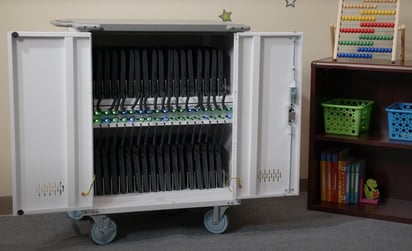 Consultant's Note: Schools are often surprised to discover their existing charging infrastructure is already compatible with newer devices after only minor updates to cables or adapters. Performing a compatibility assessment before budgeting for replacements can prevent unnecessary purchases.
Pictured: Elevate Max USB-C Charging Cart 36
When Existing Infrastructure Doesn't Need Replacing
A new device doesn't automatically require an entirely new charging strategy.
In many cases, districts can continue using existing charging carts and charging stations by:
- Updating charging cables or adapters
- Reconfiguring existing USB-C charging systems
- Supporting mixed-device deployments within the same charging solution
- Replacing only components that have reached the end of their lifecycle
Evaluating current infrastructure before purchasing new equipment helps schools maximize previous investments while preparing for future device refreshes.
Frequently Asked Questions
Can MacBook Neo charge in existing USB-C charging carts?
In many cases, yes. Charging carts that support USB-C Power Delivery and provide appropriate charging capability can typically support MacBook Neo alongside other compatible classroom devices.
Do all USB-C charging carts work the same?
No. Some carts use integrated USB-C Power Delivery charging hubs, while others use individual AC power adapters. Both approaches can support USB-C devices, but compatibility depends on how the charging system is designed and configured.
Can older charging carts be upgraded for MacBook Neo?
Often, yes. Many carts originally configured with barrel-style adapters can be updated using USB-C adapters or emulator cable systems, allowing schools to extend the life of existing infrastructure.
Do schools need to replace charging carts when adopting MacBook Neo?
Not necessarily. Many districts find their existing charging infrastructure is already compatible or can be updated without replacing the entire charging solution.
Should schools check physical fit as well as charging compatibility?
Yes. Device dimensions, protective cases, and charging bay layouts should all be evaluated to ensure new laptops fit comfortably within existing charging equipment.
Evaluate First. Replace Only When Necessary
Introducing a new device into your district doesn't have to mean starting over with your charging infrastructure.
For many schools, existing charging carts and USB-C charging systems already provide the foundation needed to support MacBook Neo. The key is understanding how those systems deliver power, whether they're configured for modern USB-C devices, and whether they can accommodate new hardware both electrically and physically.
Taking time to evaluate your current charging environment before making purchasing decisions can help extend the life of existing infrastructure, reduce unnecessary costs, and make future device refreshes far easier to manage.
Explore modern charging carts designed for today’s classrooms and see how your school can simplify device management at scale.
Further Reading
If you're evaluating new devices or preparing for a district technology refresh, these resources offer additional perspectives on charging infrastructure, classroom technology, and K–12 deployment planning.
- EdTech Magazine: Classroom Charging Stations and Carts: What to Look For
https://edtechmagazine.com/k12/article/2025/08/classroom-charging-stations-perfcon - CoSN (Consortium for School Networking): Resources and best practices for district technology leadership, infrastructure planning, and sustainable IT programs.
https://www.cosn.org/ - Apple Education: Guidance on planning, deploying, and managing Apple devices in K–12 learning environments.
https://www.apple.com/education/k12/