
Most school districts don't replace every classroom device at the same time.
A technology refresh typically unfolds over several years, leaving classrooms with a combination of Chromebooks, Windows laptops, tablets, teacher devices, and—more recently—MacBook Neo. While this gradual transition helps districts manage budgets, it also creates a new challenge: ensuring one charging strategy can support multiple device types.
The good news is that today's USB-C charging infrastructure makes mixed-device deployments more practical than ever. The key is planning around the needs of your classrooms rather than the specifications of a single device.
If your district is preparing to introduce MacBook Neo into an existing fleet, here's a practical framework for designing a charging strategy that supports today's devices while remaining flexible for tomorrow's technology.
Step 1: Take Inventory of Your Current Device Fleet
Before evaluating charging equipment, understand what you're actually supporting.
Few districts operate a single-device environment. A typical deployment might include:
- Chromebooks assigned to elementary students
- Windows laptops used in middle or high school
- Teacher-issued laptops
- USB-C tablets
- MacBook Neo devices introduced through a pilot or phased rollout
Planning Tip: Don't focus only on what you're purchasing this year. Consider the devices that will remain in service for the next three to five years.
Creating a complete inventory helps identify whether your charging infrastructure must support one device family or multiple platforms simultaneously.
Step 2: Map Where Charging Happens Throughout the School Day
Charging doesn't occur in just one location.
As you evaluate your infrastructure, consider where students actually access power during a typical day.
Some devices may return to a charging cart each afternoon, while others remain with students throughout multiple class periods. Additional charging may happen in:
 Classrooms
- Libraries and media centers
- STEM labs
- Shared learning spaces
- Testing environments
Ask yourself: Are students leaving class to find available outlets, or is charging already available where learning takes place?
Understanding existing charging workflows often reveals opportunities to improve device availability without dramatically changing infrastructure.
Step 3: Evaluate Your Existing Charging Infrastructure
Once you understand your devices and classroom workflows, review the charging equipment already in place.
Charging Carts
Determine whether your carts:
- Support USB-C Power Delivery (PD)
- Can accommodate MacBook Neo alongside existing devices
- Provide adequate device bay space for current laptops and protective cases
Many modern USB-C carts are already well suited for mixed-device deployments.
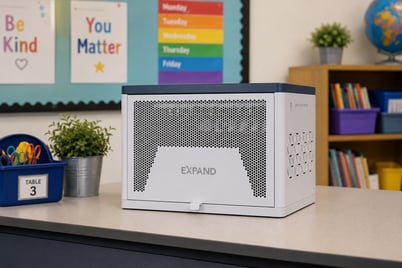 Classroom Charging Stations
If your district uses classroom charging stations, verify they provide appropriate charging capability for the devices they will support.
Higher-capacity stations may serve as the primary charging solution in some classrooms, while others provide supplemental charging throughout the day.
Portable Charging
Consider where portable power can strengthen your overall strategy.
Portable charging solutions can support:
- Testing days
- Flexible learning environments
- Temporary classroom spaces
- Battery recovery during extended instructional periods
Rather than replacing fixed infrastructure, portable power fills the gaps where permanent charging isn't practical.
Step 4: Plan for Mixed-Device Classrooms
Adding MacBook Neo shouldn't require creating a separate charging process.
Instead, your goal should be a charging environment capable of supporting multiple compatible devices through standardized USB-C infrastructure.
As you plan, consider:
- Will different device types share the same charging carts or stations?
- Does your infrastructure support USB-C Power Delivery across the fleet?
- Are charging cables standardized where possible?
- Can teachers manage charging without introducing additional complexity?
The more consistent your charging environment becomes, the easier future device refreshes will be to manage.
Step 5: Design for Your Next Refresh—Not Just This One
One of the biggest mistakes districts make is designing infrastructure around today's purchasing cycle.
Charging equipment often remains in service far longer than the laptops it supports.
A charging strategy should accommodate:
- Future Chromebook refreshes
- New Windows laptop deployments
- Additional Apple devices
- Continued growth of USB-C technology
- Evolving classroom layouts
Infrastructure that adapts over time helps reduce replacement costs and simplifies future technology planning.
A Planning Checklist for District IT Teams
Before introducing MacBook Neo into your classrooms, review these key questions:
✓ Have we documented every device type currently in service?
✓ Can our charging carts and stations support USB-C Power Delivery?
✓ Have we confirmed both electrical compatibility and physical fit?
✓ Are classroom charging workflows consistent across buildings?
✓ Do we have a plan for supplemental charging during testing or extended instructional days?
✓ Will today's charging infrastructure support our next device refresh as well?
Answering these questions early can prevent costly infrastructure changes later.
Successful Charging Strategies Focus on Flexibility
Technology in K–12 classrooms will continue to evolve.
Today's mixed-device environment may look different again in just a few years, which is why charging strategies should prioritize flexibility over individual device models.
By evaluating your existing infrastructure, understanding classroom workflows, and planning for future refresh cycles, districts can introduce MacBook Neo alongside Chromebooks, Windows laptops, and other USB-C devices without creating unnecessary complexity.
The most effective charging strategies aren't designed around a single laptop—they're designed to support whatever comes next.