
Every time a new device enters the K–12 market, district IT teams face the same challenge: it's not just about evaluating the laptop—it's about evaluating everything that supports it.
Apple emphasizes this same planning-first approach in its Apple Deployment Guide for Education, which encourages schools to evaluate infrastructure, deployment workflows, and long-term device management before introducing new hardware.
Will it work with existing charging carts? Can classrooms support another device type? Will today's infrastructure still make sense during the next refresh cycle?
Those questions become especially important as districts continue moving toward standardized USB-C charging environments while managing increasingly diverse device fleets.
MacBook Neo isn't simply another laptop entering the classroom. It's another opportunity for schools to evaluate whether their charging infrastructure is ready for what's next.
Rather than focusing on the device itself, this article explores what MacBook Neo means for charging, compatibility, and long-term deployment planning in K–12 environments.
MacBook Neo Arrives as Schools Continue Standardizing Around USB-C
MacBook Neo enters the education market at a time when many districts are simplifying their charging infrastructure.
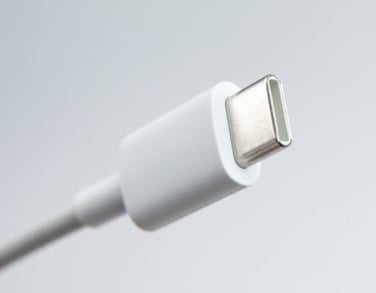 Device manufacturers are increasingly standardizing on USB-C Power Delivery (PD) as the common charging standard across:
- Chromebooks
- Windows laptops
- Tablets
- Teacher-issued devices
- New Apple hardware
That shift has changed the conversation.
A few years ago, introducing another device platform often meant introducing another charging solution. Today, the question is less about connectors and more about whether existing infrastructure can safely and efficiently support another USB-C device.
This shift aligns with broader recommendations from the State Educational Technology Directors Association (SETDA), which encourages districts to plan technology infrastructure with long-term interoperability and device lifecycle management in mind rather than around individual hardware refreshes.
For many districts, MacBook Neo fits into an industry trend that has been building for years rather than introducing an entirely new one.
Three Questions Every IT Team Should Ask Before Deploying MacBook Neo
Instead of asking whether MacBook Neo is compatible, schools should evaluate how it fits into their broader technology ecosystem.
1. Will our existing charging infrastructure support it?
Modern USB-C charging carts, charging stations, and portable charging solutions are often designed to support multiple compatible device types.
However, successful deployment depends on more than simply having a USB-C connector.
IT teams should evaluate:
- USB-C Power Delivery support
- Available charging wattage
- Physical device fit within charging bays
The charging system, not the connector alone, determines compatibility. Districts should evaluate whether existing charging solutions that utilize AC adapters will need to be re-wired with new adapters to accommodate USB-C charging and the associated costs of such a project. Holistically, if these efforts exceed the value of the charging solution and the ensuing routine maintenance, upgrading to new USB-C PD hub-powered solutions may be a better option. Some AC charging solutions may be easily retrofitted with USB-C charging hubs, providing an alternative to a full replacement.
2. How will MacBook Neo fit into our existing device mix?
Very few districts operate single-device environments. Many already support combinations of Chromebooks, Windows laptops, tablets, and various teacher devices—many of which already feature USB-C charging ports.
MacBook Neo becomes another device within that ecosystem rather than replacing everything already in place. Planning for mixed-device support helps districts avoid building isolated charging workflows for individual device types.
3. Are we planning for today's rollout—or tomorrow's refresh cycle?
Technology purchasing rarely happens all at once. Schools replace devices gradually as budgets, grade levels, and instructional needs evolve. Charging infrastructure should support that reality.
Rather than selecting solutions designed around a single laptop model, districts benefit from infrastructure capable of adapting as device fleets continue changing.
The Biggest Challenge Often Isn't the Laptop
When new devices are introduced, conversations often focus on specifications, operating systems, or performance. But, operationally, IT teams find themselves managing questions like:
- Where will devices charge?
- How will students access power during the day?
- Can classrooms support mixed-device charging?
- Will existing infrastructure scale?
Successful deployments depend as much on charging strategy as they do on device selection. Modern USB-C charging infrastructure—including charging carts, classroom charging stations, and portable charging solutions—allows districts to support multiple compatible devices without creating separate charging ecosystems.
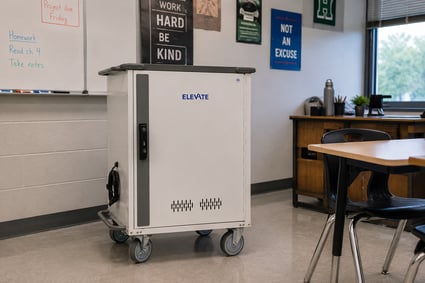 One example is JAR Systems' Elevate™ Charging Carts, which are designed around USB-C Power Delivery rather than relying on individual AC adapters for each device. Features such as intelligent power distribution, organized cable management, and support for mixed-device environments help districts simplify charging while preparing for future device refreshes.
Building Infrastructure That Lasts Beyond One Device Refresh
The arrival of MacBook Neo is part of a much larger trend in K–12 technology.
Device manufacturers continue moving toward standardized USB-C charging, while districts continue balancing:
- Budget cycles
- Aging hardware
- Mixed-device environments
- Evolving classroom workflows
Charging infrastructure should be designed with those long-term realities in mind.
Schools that invest in flexible USB-C charging systems position themselves to support future device refreshes without redesigning their entire charging strategy every time new hardware is introduced.
This approach aligns with broader K–12 technology planning priorities identified by organizations such as CoSN, which consistently highlight sustainable infrastructure, device lifecycle management, and operational efficiency as critical considerations for district technology leaders.
Key Takeaways for District IT Leaders
Before deploying MacBook Neo, keep these considerations in mind:
- Modern USB-C infrastructure can often support MacBook Neo alongside Chromebooks, Windows laptops, and tablets.
- Compatibility depends on charging architecture—not simply having USB-C connectors.
- Physical fit within charging carts should be evaluated alongside electrical compatibility.
- Planning for mixed-device environments helps extend the life of charging infrastructure.
- Flexible charging systems reduce complexity during future device refresh cycles.
The Device May Be New—Your Charging Strategy Doesn't Have to Be
MacBook Neo represents another step in the ongoing evolution of classroom technology, but it doesn't require districts to rethink everything they know about device charging.
Schools that have invested in scalable USB-C infrastructure are often well positioned to integrate new devices while continuing to support existing fleets.
The goal isn't to build charging systems around a single laptop. It's to build infrastructure that can adapt as technology continues to evolve.